Managing inventory manually works at the beginning, but it eventually becomes stressful as your business grows. Such as spreadsheets get messy, numbers stop matching, and small mistakes turn into big losses. This creates a huge crisis in managing the business, and eventually it slows down the growth. That’s why you must need to switch to automated inventory management or business automation to operate your entire business smoothly.
This guide will show you how to move from manual inventory management to automation using FullStro, step by step, without disrupting your business.
What Is Manual Inventory Management and Why Does It Become a Problem
Manual inventory management means tracking stock using spreadsheets, notebooks, or basic tools without real-time automation. Many businesses start this way because it feels simple and low-cost.
But over time, manual systems create hidden problems that slow you down.
Common issues with manual inventory management include:
- Stock numbers that do not match reality
- Time wasted updating sheets and reports
- Human errors from typing and calculations
- No real-time visibility across sales channels
As order volume increases, manual tracking becomes harder to control. One small mistake can cause overstock, stockouts, or delayed orders.
Signs Your Business Is Ready for Automated Inventory Management
Most businesses do not switch to automation because they want to. They switch because they have to. If these below situations sound familiar, it is a clear sign you are ready. Look out for these warning signs:
- You often run out of fast-moving products
- You have excess stock sitting unsold for months
- Inventory numbers differ between warehouse and sales platforms
- Your team spends hours fixing inventory mistakes
- Forecasting demand feels like guessing
When inventory management starts affecting customer satisfaction and cash flow, automation is no longer optional.
What Is Automated Inventory Management
Automated inventory management uses software to track stock levels in real time. Every sale, return, or restock updates inventory automatically without manual input. Instead of reacting to problems, automation helps you plan ahead. With automated inventory management, you can:
The goal is simple. Less manual work, fewer errors, and more control over your inventory.
Manual vs Automated Inventory Management
Understanding the difference helps you see why automation matters.
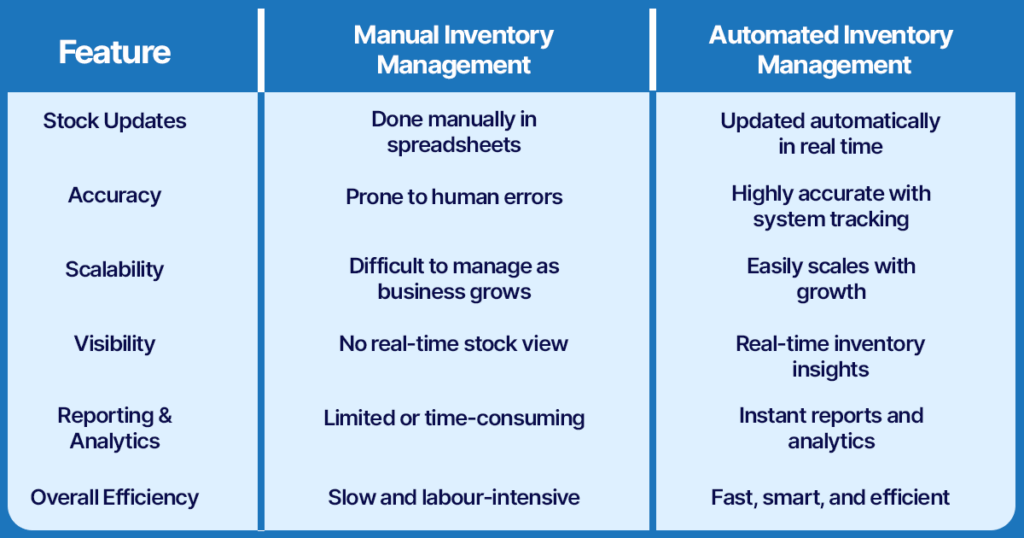
Automation replaces guesswork with clarity.
Why Choose FullStro for Inventory Automation
FullStro is a smart cloud-based inventory management system designed to help businesses track, manage, and control stock in real time across multiple locations and sales channels. It automates inventory updates, alerts, reporting, and multi-channel syncing to reduce errors and prevent stockouts or overstocking.
Not all inventory software is built for growing businesses. FullStro is designed to simplify inventory management while supporting long-term growth. With FullStro, businesses get clear visibility, better planning, and smoother operations—all from one simple dashboard.
FullStro helps businesses:
Whether you run an eCommerce store, a retail business, or a growing brand, FullStro adapts to your workflow instead of forcing you to change everything overnight.
How to Switch from Manual to Automated Inventory Management Using FullStro
Let’s walk you through a step-by-step guide to switching from manual inventory management to automation easily.
Step 1: Audit Your Current Inventory Process
Before switching to automation, you need to understand how your current system works and where it fails.
Start by reviewing:
- How you record stock in and stock out
- Where errors usually happen
- Which products cause frequent issues
This audit helps you clean up problems before moving data into FullStro. Automation works best when the starting data is accurate.
Step 2: Organize and Prepare Your Inventory Data
Messy data creates messy results, even with good software. Take time to organize your inventory before importing it.
Make sure to:
- Standardize product names and SKUs
- Remove duplicate or outdated items
- Verify quantities for each product
- Categorize products properly
Clean data makes the transition smoother and avoids confusion later.
Step 3: Set Up Your FullStro Account
Once your data is ready, setting up FullStro is straightforward. You can configure the system based on how your business operates.
During setup, you will:
- Add warehouses or storage locations
- Define stock rules and thresholds
- Assign user roles to your team
This step ensures that everyone uses the system correctly from day one.
Step 4: Import Your Inventory into FullStro
After setup, import your inventory data into FullStro. This can be done using templates or integrations, depending on your needs.
Important checks before going live:
- Confirm product quantities
- Verify pricing and cost data
- Review product categories
Taking a little extra time here prevents errors after automation begins.
Step 5: Connect Sales Channels and Suppliers
One of the biggest benefits of FullStro is multi-channel synchronization. When all platforms are connected, inventory updates automatically across every channel.
You can connect:
- eCommerce platforms
- Marketplaces
- Physical stores
- Suppliers
This eliminates overselling and keeps stock numbers accurate everywhere.
Step 6: Configure Automation Rules
Automation works best when rules are clearly defined. FullStro allows you to set rules based on your business needs.
You can automate:
- Reorder points
- Low stock alerts
- Purchase order creation
- Lead-time planning
These rules reduce manual work and ensure you never miss important inventory signals.
Training Your Team for a Smooth Transition
Switching to automated inventory is not just about software. Your team plays a big role in making the transition successful. When employees understand the system and feel comfortable using it, automation becomes easier, faster, and far more effective.
Your team needs to understand and trust the system. To ensure smooth adoption:
- Train staff on daily workflows
- Explain how automation reduces their workload
- Encourage feedback during early usage
When your team feels confident, resistance disappears quickly.
Common Challenges During the Transition and How FullStro Helps
Moving from manual to automated inventory can feel overwhelming at first. But with the right tools and support, most challenges are easier to handle than you might expect.
Common concerns include:
- Fear of losing important data
- Learning how a new system works
- Temporary disruption to daily workflows
FullStro helps solve these by offering:
- A simple, user-friendly interface
- Step-by-step guided setup
- Secure and reliable data handling
With the right support in place, most businesses adapt quickly and start seeing benefits sooner than expected.
Benefits You Will See After Switching to FullStro
Once you switch to FullStro and automate your inventory, the positive changes show up quickly. Tasks that once took hours become simple, and mistakes that were common start disappearing.
Key benefits you will notice include:
- Accurate stock levels across all locations and sales channels
- Faster order processing and happier customers
- Lower storage and ordering costs through smarter planning
- Improved demand forecasting using real-time data
Instead of constantly fixing inventory problems, you can focus on growing your business. With FullStro, inventory becomes a powerful tool that supports your success rather than a daily struggle.
Best Practices for Long-Term Success with Automated Inventory
Automating your inventory is a great first step, but long-term success comes from how well you manage and improve the system over time. When you actively monitor data, adapt to demand changes, and keep your team trained, automated inventory becomes a powerful tool for growth instead of just a tracking system.
Automation is not a one-time task. Ongoing management keeps it effective. Best practices you will benefit from:
- Reviewing inventory reports regularly
- Adjusting reorder points based on demand
- Using analytics to improve planning
- Training new team members early
Consistency ensures automation continues to deliver value.
Why Automated Inventory Matters for Business Growth
As your business grows, managing inventory becomes more complex. You deal with more products, more suppliers, more sales channels, and higher customer expectations. Without the right system, this growth often leads to confusion, costly mistakes, and constant stress.
Automated inventory management helps you:
- Scale smoothly without losing control of stock
- Keep accurate inventory across all platforms and locations
- Deliver orders on time, building customer trust and loyalty
- Reduce waste, overstock, and unnecessary expenses
- Make smarter decisions using real-time data reporting & analytics
Without automation, growth can quickly turn into burnout and inefficiency. With it, your inventory becomes a strong foundation that supports long-term success instead of holding your business back.
Conclusion
Transitioning from manual to automated inventory management is one of the smartest moves a growing business can make. It saves time, reduces errors, and improves decision-making.
With FullStro, the transition is simple, structured, and scalable. You do not need to overhaul your business overnight. Start small, automate smartly, and let your inventory work for you instead of against you.