Steadfast Integration With FullStro

Connecting Steadfast and FullStro’s API is way simpler than you think. It’s just some easy steps that you need to follow. 

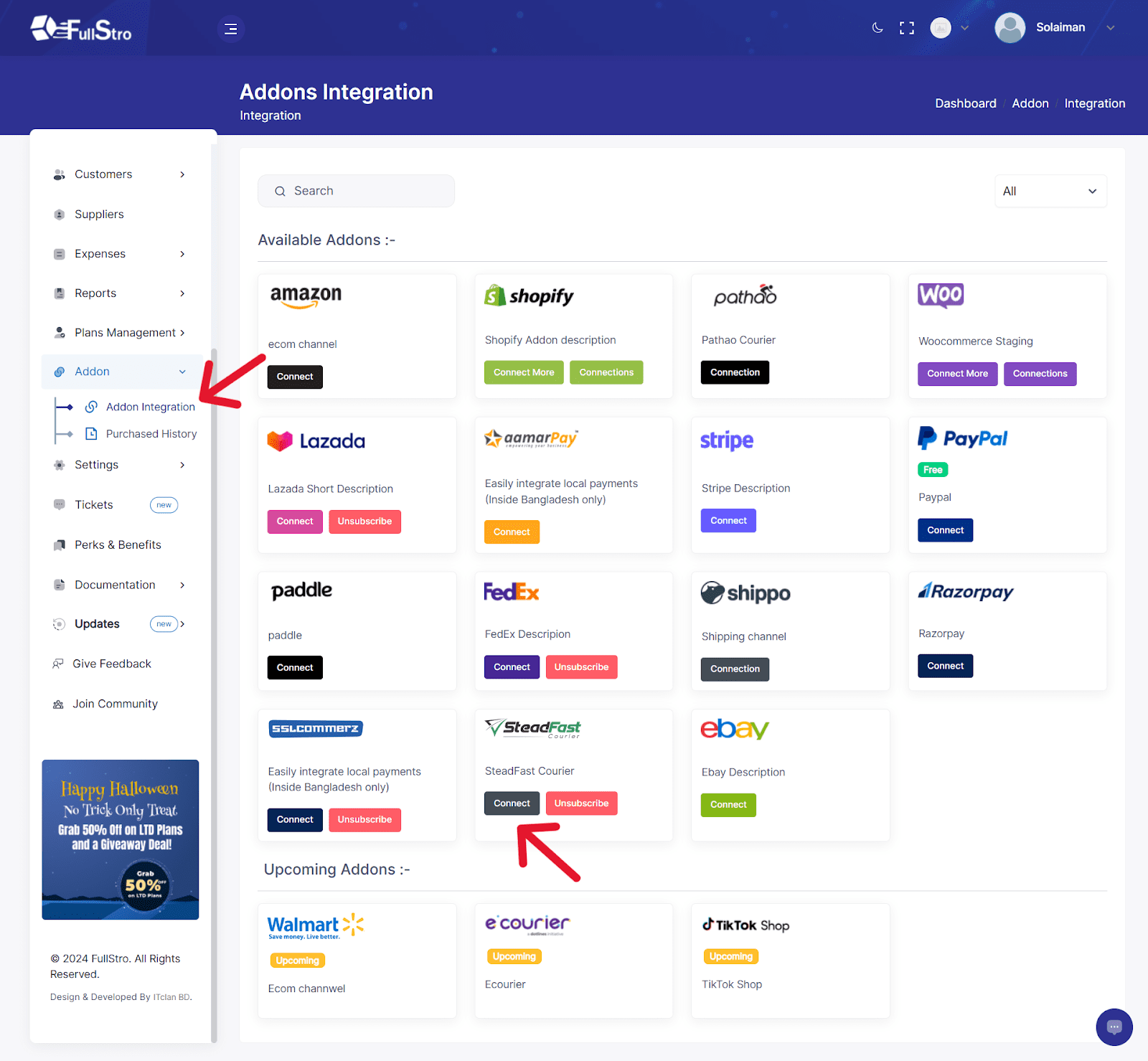
1. Log in to your FullStro account, go to the right panel, and click on Addon > Addon Integration on the left panel. You will see the Addon Integration dashboard showing available integrations. Click on the Steadfast Connect button. 
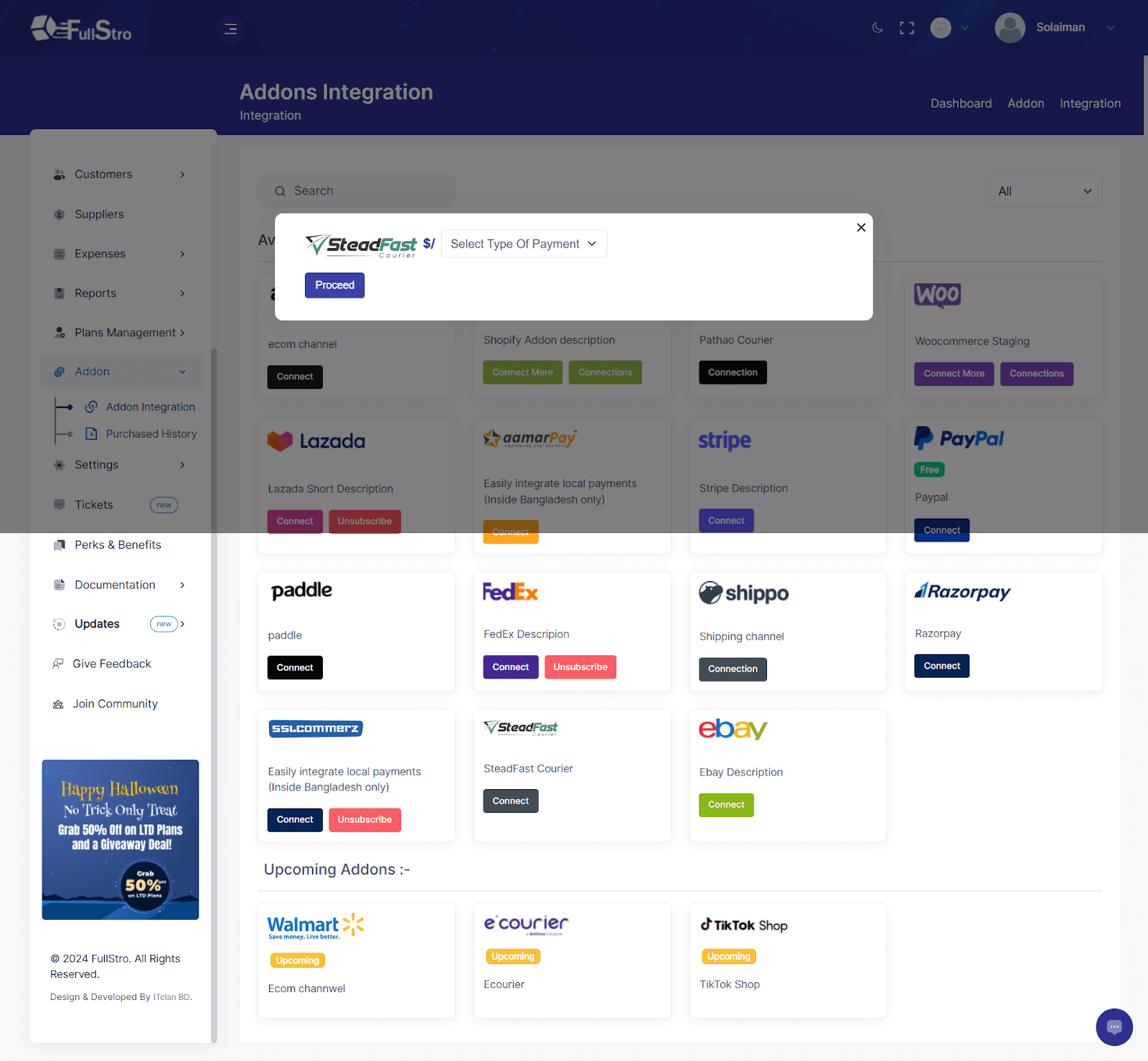
2. Now, a pop-up will appear on the screen asking for your payment details. Select your payment type and press “Proceed.”
3. If you want to pay with aamarPay, choose it or you can choose another option. Now, click on aamarPay and provide your payment details, then press pay.
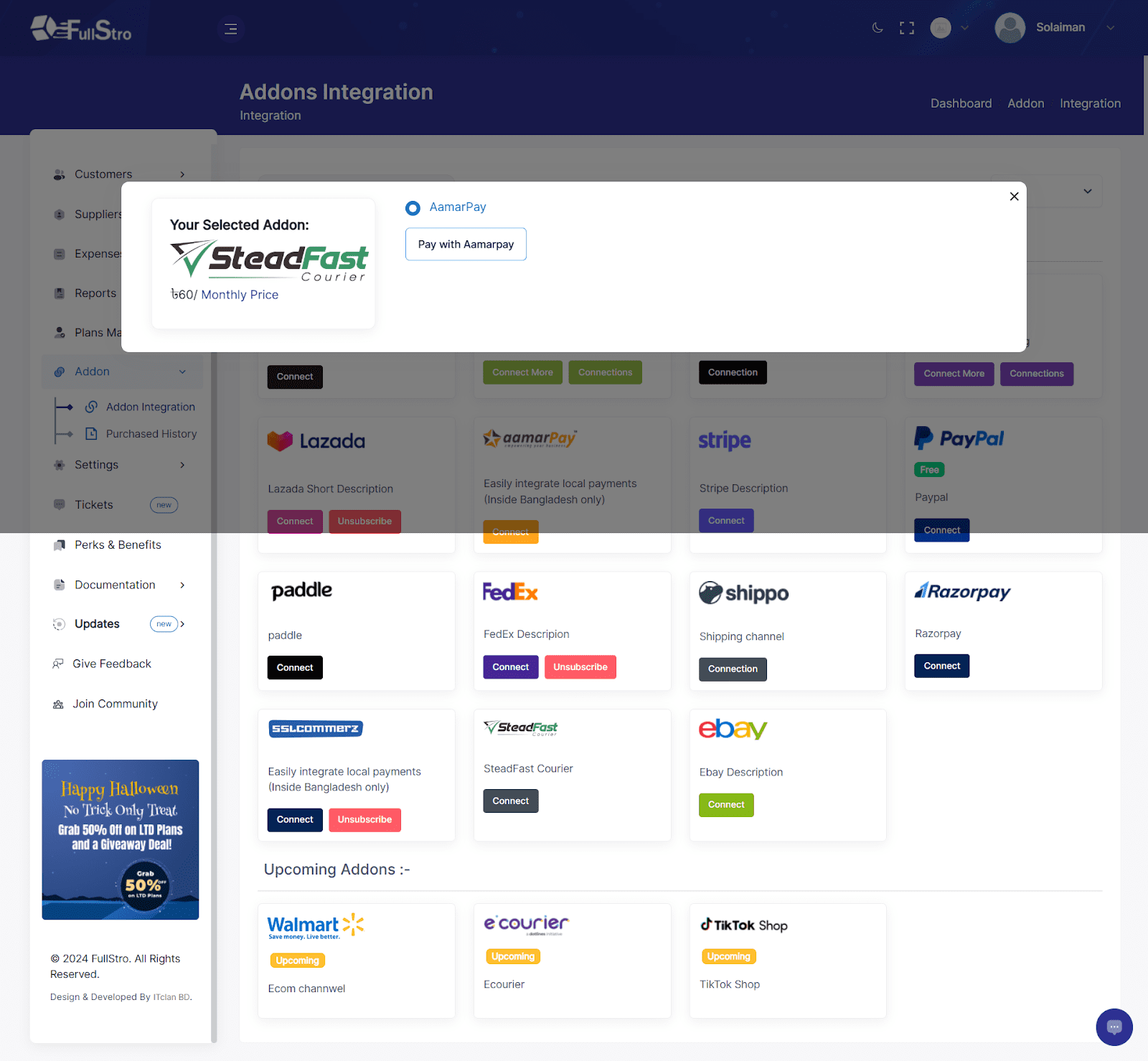
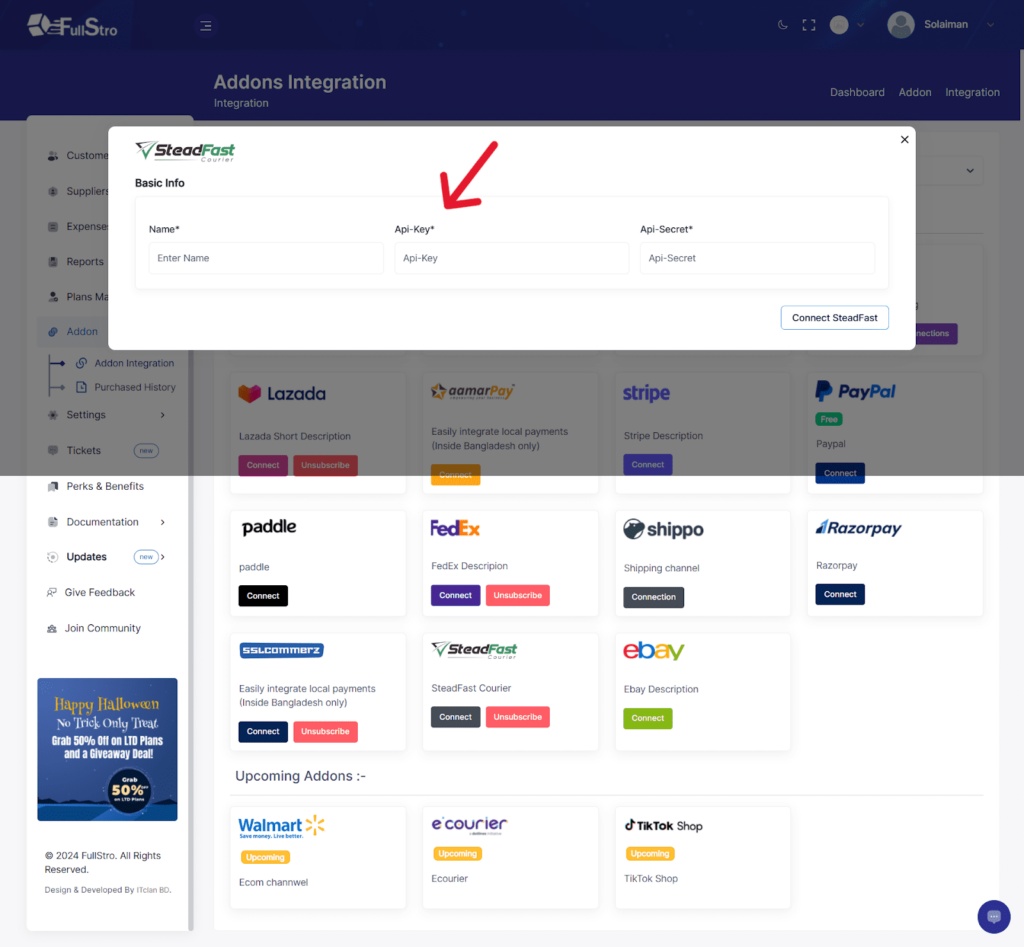
4. Once your payment has been made, it’s time to connect the APIs. To connect, it will ask for the API key and you have to collect the API from your Steadfast account.
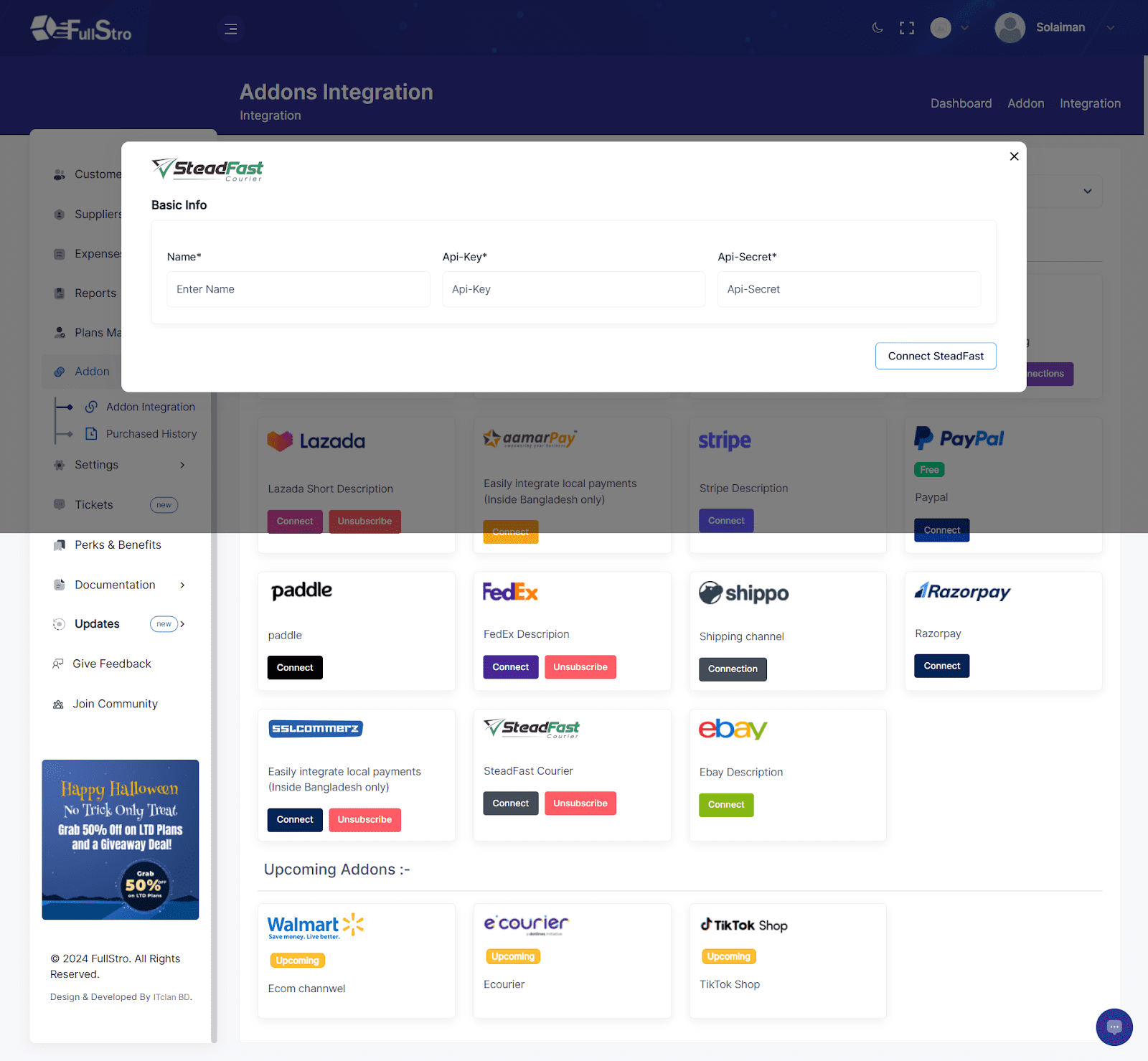
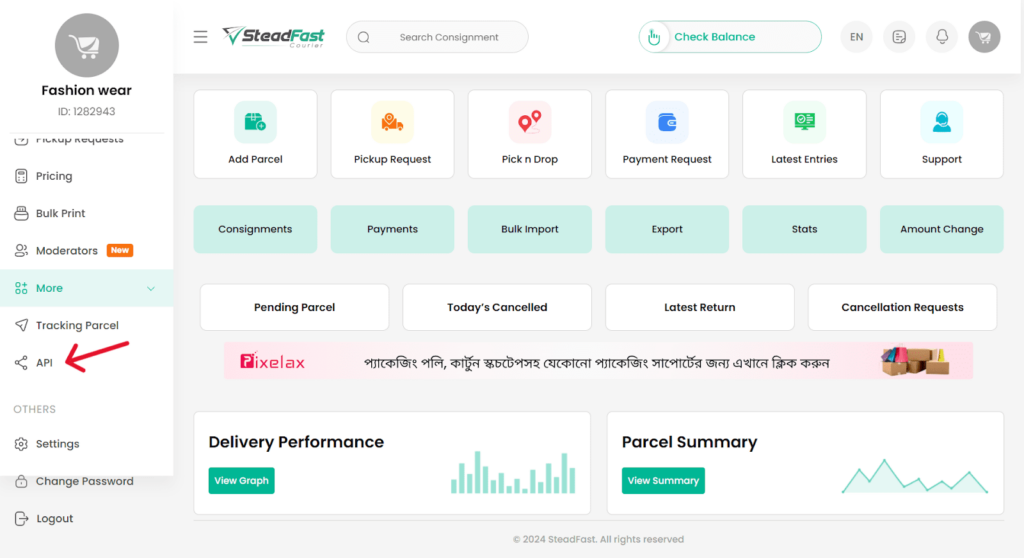
5. Now you log in to your Steadfast account and click on API on the left.
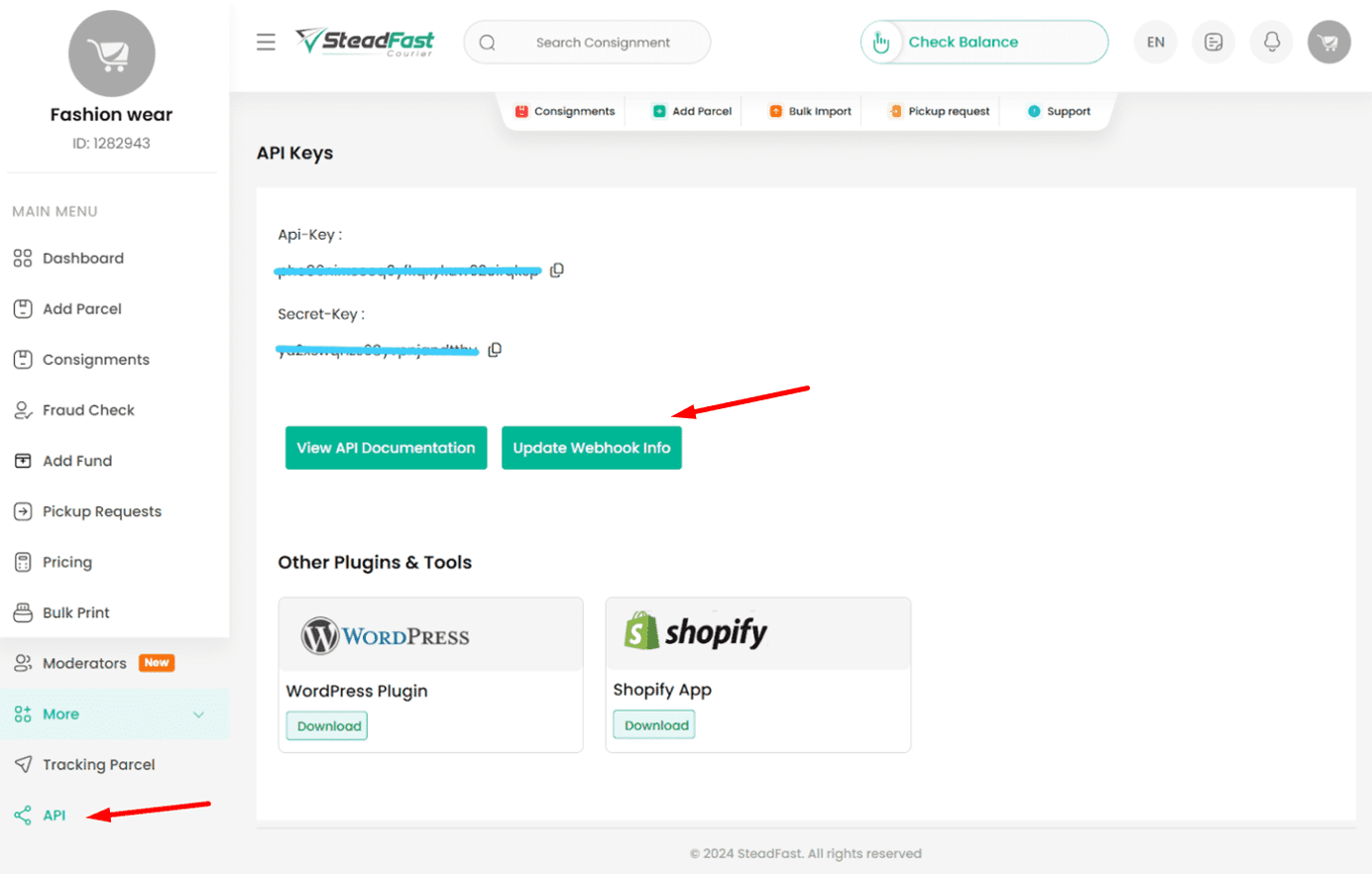
6. On the dashboard, you will see the API key and Secret Key. Copy these and submit them to FullStro’s API key details. Now, press “Connect Steadfast”.
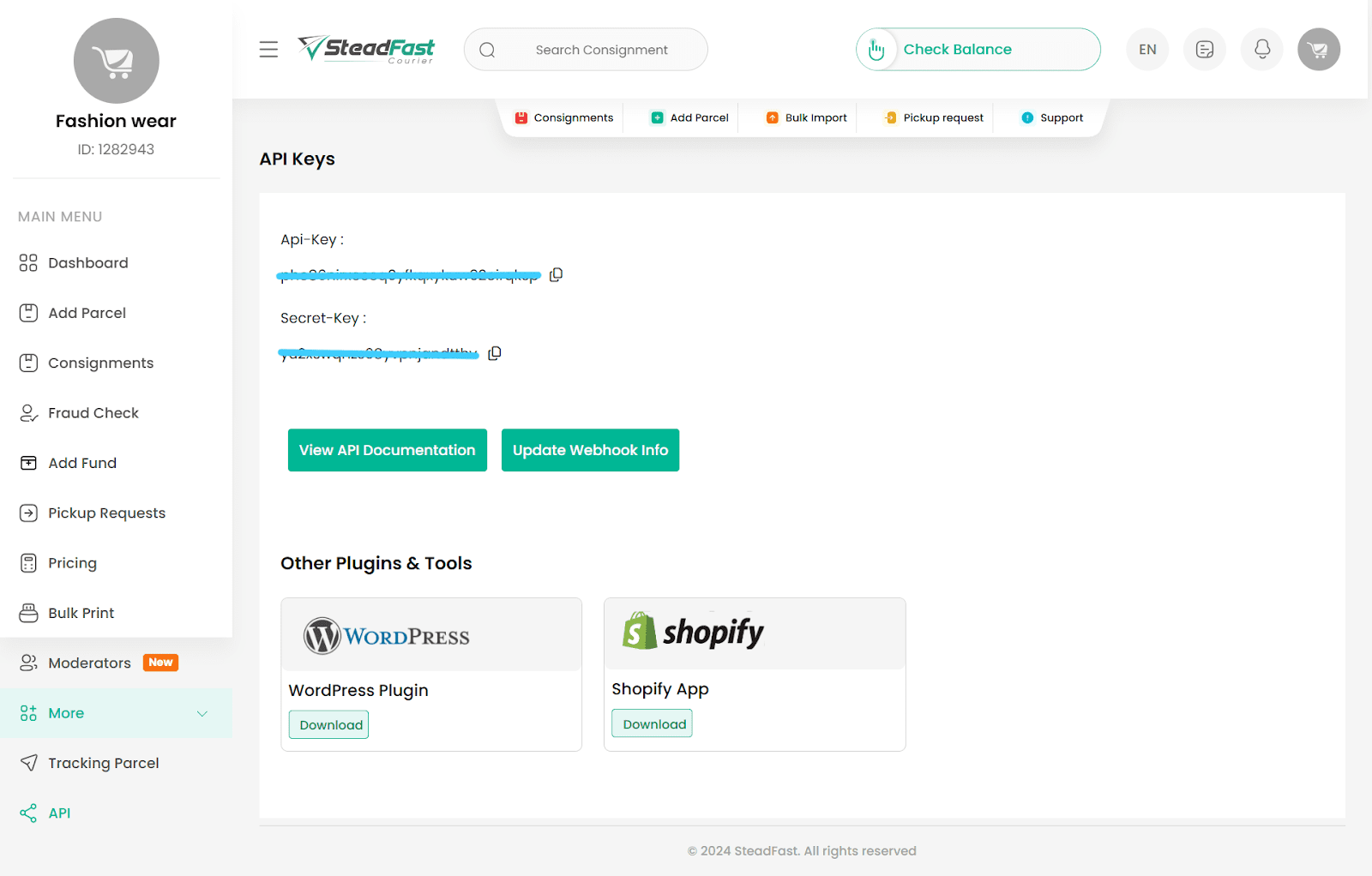
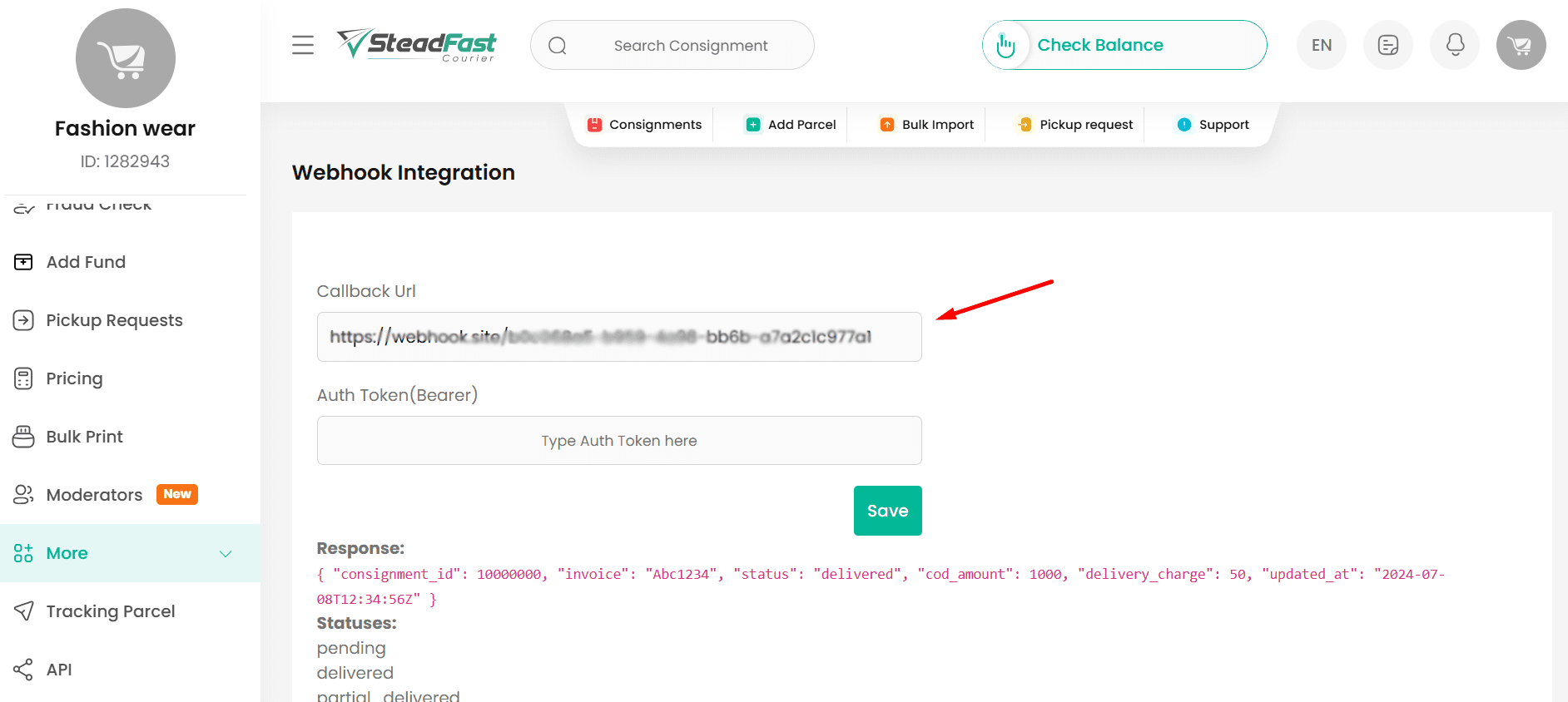
Plus, if you want to connect to Webhook, please click on the “Update Webhook Info”.
You can choose to integrate webhook for status updates of your individual delivery. You only need to provide us with a Callback URL, where you will receive a POST request containing event details. Your callback URL should be like- https://{{your_subdomain}}.fullstro.com/api/v1/product-service/shipping/steadfast/webhook
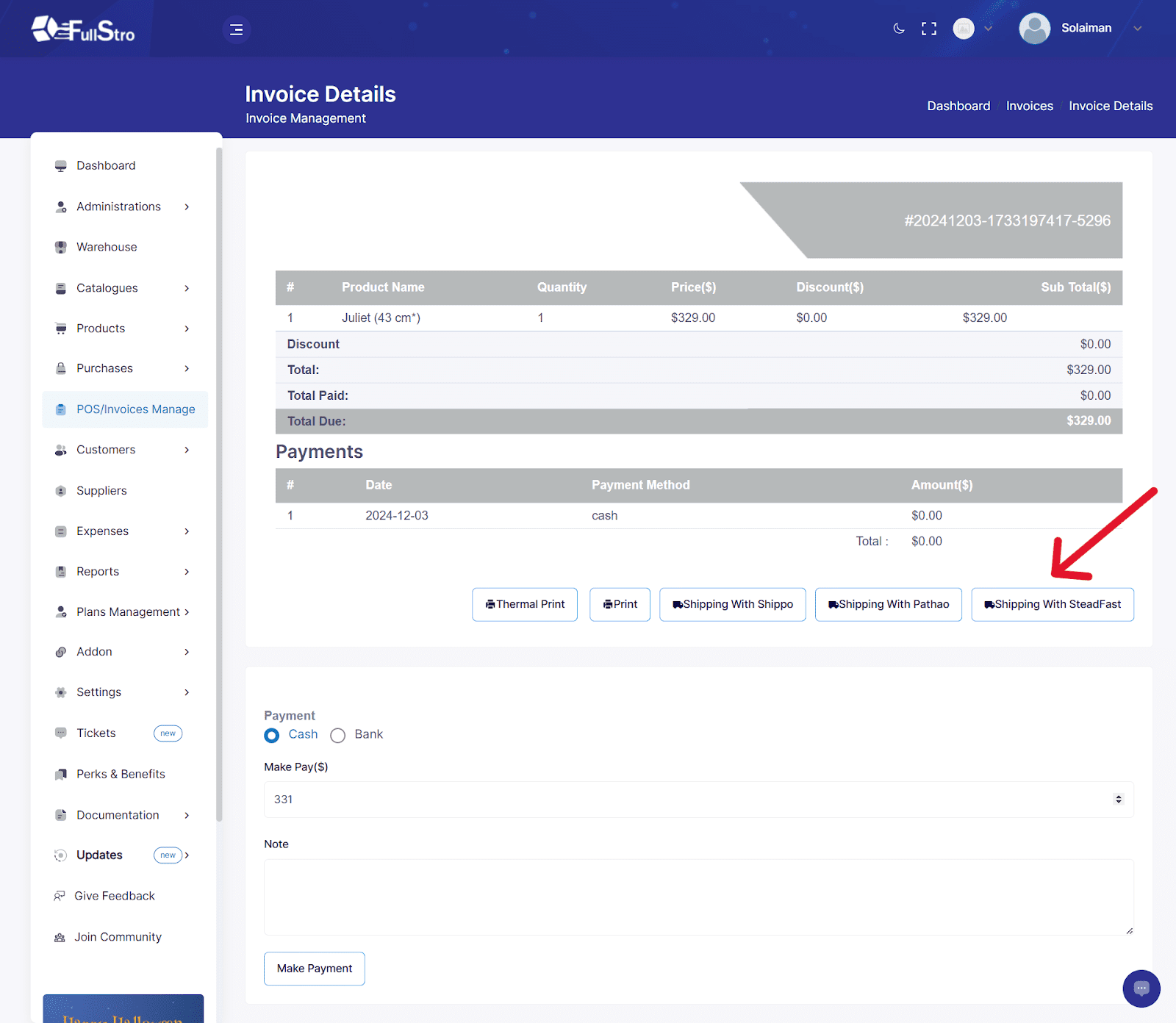
7. Steadfast is fully connected with your FullStro account. Go to your POS/invoice manage, you can see that the Steadfast is now available on your options. Click to proceed.
8. Now, put the required information and you can deliver your product through this feature with ease.
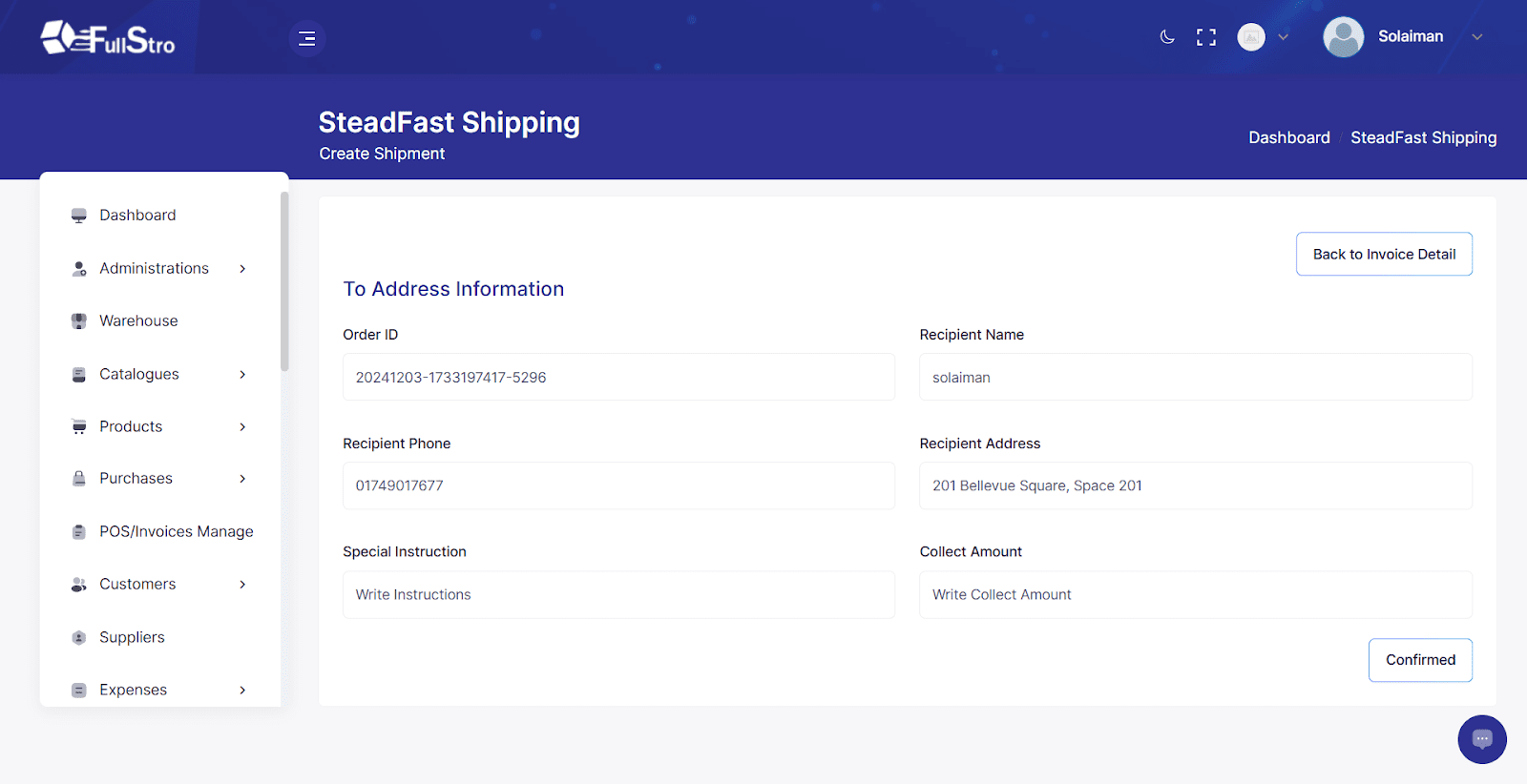
9. Plus, you can set tracking options for your clients through Steadfast.
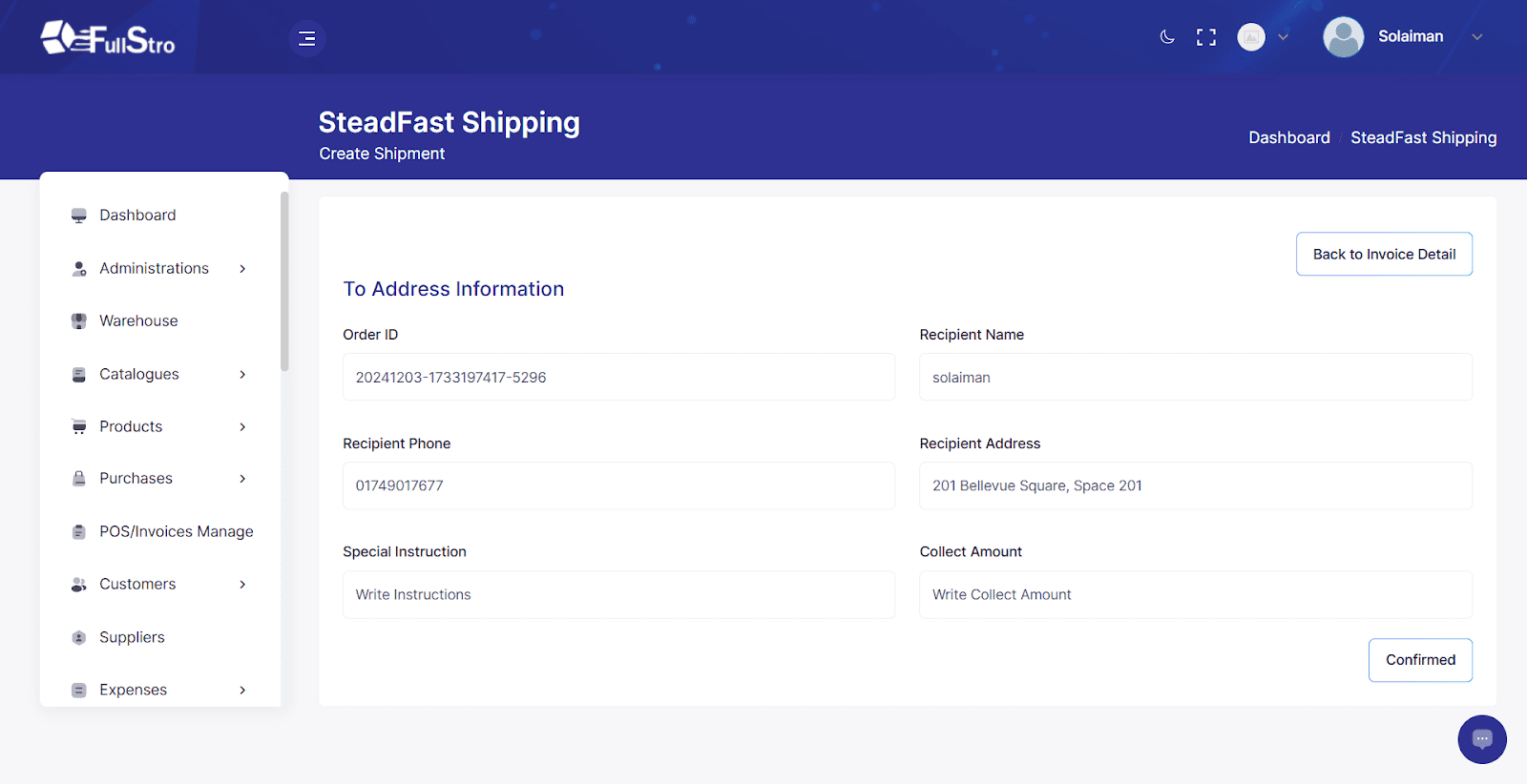
You are all set to connect your Steadfast account with Fullstro. Now you can have hassle-free shipping for your clients with Steadfast anytime.

Pathao Integration Guide

Connecting Pathao and FullStro’s API is way simpler than you think. It’s just some easy steps that you need to follow.

1. First, go to the right panel of your FullStro account, and click on Addon > Addon Integration on the left panel. You will see the Addon Integration dashboard showing available integrations. Click on the Pathao Connect button

2. Now, a pop-up will appear on the screen asking for your payment details. Select your payment type and press “Proceed.”

3. If you want to pay with aamarPay, choose it or you can choose another option. Now, click on aamarPay and provide your payment details, then press pay.

4. Once your payment has been made, it’s time to connect the APIs. To connect, it will ask for the API details from your Pathao account.

5. Log in to your Pathao account and go to the right panel on the dashboard. Click on “Developers API” and collect API credentials to submit on FullStro’s API details. 

You can choose to integrate webhook for status updates of your individual delivery. You only need to provide us with a Callback URL and Webhook secret, where you will receive a POST request containing event details. Your callback URL should be like- https://{{your_subdomain}}.fullstro.com/api/v1/product-service/shipping/pathao/webhook

6. Submit the details and press the connect button. Now, your Pathao addon is fully connected with your FullStro and you can easily deliver your product through Pathao.

7. To use Pathao as a delivery platform, go to your POS/invoice manager. You can see that Pathao is now available on your options. Click to proceed.

8. Now, put the required information and you can deliver your product through this feature with ease.

9. You can set tracking options for your clients through Pathao.

You are all set to connect Pathao with Fullstro. Now you can have hassle-free shipping for your clients with Pathao anytime. 

eCourier Integration with FullStro

Connecting eCourier with FullStro’s API is simpler than you think. Just follow these easy steps:

Step 1: Initiate the Connection

  • Log in to your FullStro dashboard.
  • Navigate to Addon > Addon Integration from the left sidebar.

On the Addon Integration page, find eCourier and click the “Connect” button.

Step 2: Complete the Payment

  • A pop-up will appear requesting payment.
  • Click “Proceed” to view the payment details.
  • Enter your payment information and complete the transaction.

Step 3: Enter API Credentials

  1. After payment, you’ll be prompted to enter your eCourier API Key.
  2. To get your API Key:
    • Log in to your eCourier Merchant Account.
    • Submit a support ticket requesting API credentials.
    • eCourier will send the keys to your email.

Copy the credentials and paste them into the FullStro eCourier Addon configuration section.

Step 4: Create & Track Shipments

  • Once connected, you can now:
    • Create shipment orders directly from the POS or Order Details page.

Track shipments from the Order List or Order Details.

Step 5: Real-time Notifications

To enable real-time tracking notifications, contact eCourier support and provide them with the required notification mapping.

You’re All Set!

Your eCourier integration with FullStro is now complete. Enjoy seamless, hassle-free shipping for your clients using the eCourier delivery channel!


Sundarban Courier Service Integration

Integrating this addon with FullStro’s API is a straightforward process. Follow these steps to enable seamless shipping channel connectivity through this addon.

Step 1: Start the Connection

  1. Log in to your FullStro account.
  2. Navigate to Addon > Addon Integration from the left sidebar.
  3. On the Addon Integration page, locate your desired addon and click the “Connect” button.

Step 2: Make the Payment

It is free, so no need to pay right now.

Step 3: Finalize the Integration

Just click on the connect button and enjoy.

You’re All Set! The shipping channel is now successfully integrated with FullStro. Enjoy secure delivery processing for your business.

SA Paribahan Courier Service Integration with FullStro

Integrating this addon with FullStro’s API is a straightforward process. Follow these steps to enable seamless shipping channel connectivity through this addon.

Step 1: Start the Connection

  1. Log in to your FullStro account.
  2. Navigate to Addon > Addon Integration from the left sidebar.
  3. On the Addon Integration page, locate your desired addon and click the “Connect” button.

Step 2: Make the Payment

  • It is free, so no need to pay right now.

Step 3: Finalize the Integration

  • Just click on the connect button and enjoy.

You’re All Set! The shipping channel is now successfully integrated with FullStro. Enjoy secure delivery processing for your business.

Shodagor courier service Integration with Fullstro

Integrating this addon with FullStro’s API is a straightforward process. Follow these steps to enable seamless shipping channel connectivity through this addon.

Step 1: Start the Connection

Log in to your FullStro account.

Navigate to Addon > Addon Integration from the left sidebar.

On the Addon Integration page, locate your desired addon and click the “Connect” button.

Step 2: Make the Payment

It is free, so no need to pay right now.


Step 3: Finalize the Integration

Just click on the connect button and enjoy.

You’re All Set! The shipping channel is now successfully integrated with FullStro. Enjoy secure delivery processing for your business.

Sheba.xyz Integration with FullStro

Integrating this addon with FullStro’s API is a straightforward process. Follow these steps to enable seamless shipping channel connectivity through this addon.

Step 1: Start the Connection

  • Log in to your FullStro account.
  • Navigate to Addon > Addon Integration from the left sidebar.
  • On the Addon Integration page, locate your desired addon and click the “Connect” button.

Step 2: Make the Payment

  • It is free, so no need to pay right now.

Step 3: Finalize the Integration

  • Just click on the connect button and enjoy.

Karatoa Courier Service Integration

Integrating this addon with FullStro’s API is a straightforward process. Follow these steps to enable seamless shipping channel connectivity through this addon.

Step 1: Start the Connection

Log in to your FullStro account.

Navigate to Addon > Addon Integration from the left sidebar.

On the Addon Integration page, locate your desired addon and click the “Connect” button.

Step 2: Make the Payment

It is free, so no need to pay right now.

Step 3: Finalize the Integration

Just click on the connect button and enjoy.

You’re All Set! The shipping channel is now successfully integrated with FullStro. Enjoy secure delivery processing for your business.

Delivery Tiger Integration

Integrating Delivery Tiger with FullStro’s API is a straightforward process. Follow these steps to enable seamless shipping channel connectivity through Delivery Tiger.

Step 1: Start the Connection

  1. Log in to your FullStro account.
  2. Navigate to Addon > Addon Integration from the left sidebar.
  3. On the Addon Integration page, locate Delivery Tiger and click the “Connect” button.

Step 2: Make the Payment

It is free, so no need to pay right now.

Step 3: Finalize the Integration

Just click on the connect button and enjoy.

You’re All Set! The shipping channel is now successfully integrated with FullStro. Enjoy secure delivery processing for your business.


WhatsApp Chat