Running a small manufacturing business is exciting, but let’s be real! Keeping track of every raw material, work-in-progress item, and finished product can feel like juggling flaming torches. One missed order, a stock shortage, or an overstocked warehouse can quickly eat into your profits. That’s where manufacturing inventory software comes in. It’s designed to make life easier for small businesses, helping yo u save time, cut costs, and keep operations running smoothly.
In this guide, we’ll walk you through everything you need to know about manufacturing inventory software, why small businesses need it, how to choose the right system, and how tools like FullStro can transform your workflow.
What Is Manufacturing Inventory Software?
Simply put, manufacturing inventory software is a tool that helps businesses track and manage their inventory digitally. Instead of relying on spreadsheets or manual counts, the software gives you real-time visibility over every raw material, component, and finished product.
For small businesses, this means you can see what’s in stock, what’s being produced, and what’s ready to ship — all in one place. It reduces errors, improves efficiency, and gives you control over your entire production process.
Why Small Businesses Need Manufacturing Inventory Software
Inventory management isn’t just about knowing what you have in stock. For small manufacturers, it’s about survival and growth. Here’s why:
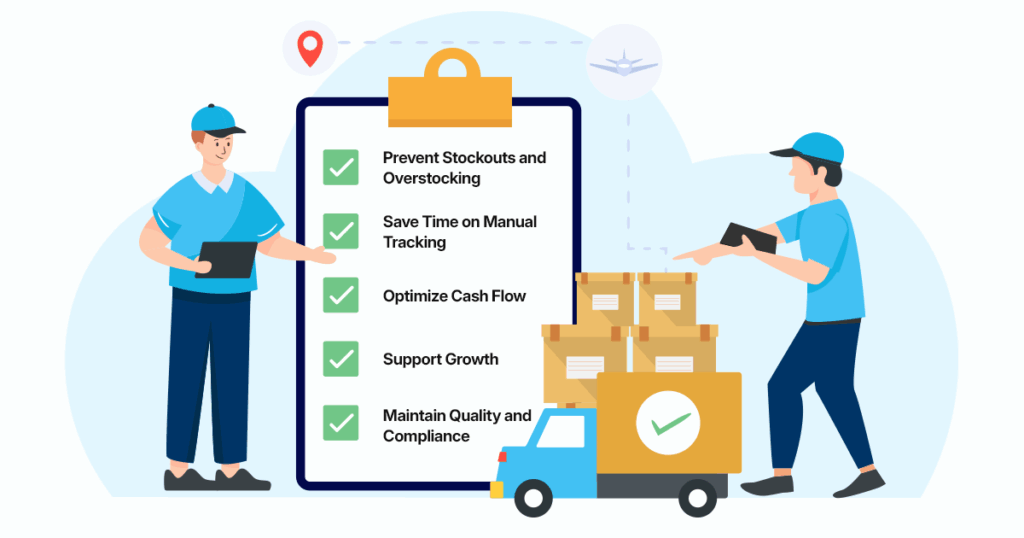
- Prevent Stockouts and Overstocking – Running out of materials stops production, while too much stock ties up cash. Software helps you find the perfect balance.
- Save Time on Manual Tracking – No more updating spreadsheets or hunting for misplaced parts. Your team can focus on production and growth.
- Optimize Cash Flow – By managing inventory efficiently, you free up money to invest in marketing, equipment, or expansion.
- Support Growth – A scalable system grows with your business, whether you add new products, warehouses, or sales channels.
- Maintain Quality and Compliance – Track every batch, lot, or work-in-progress item to ensure consistency and meet regulatory requirements.
Without good software, you risk wasted materials, delayed orders, frustrated customers, and higher costs. But a tailored system changes everything: real-time visibility, automated alerts, and smarter planning.
The payoff? Lower carrying costs, fewer errors, better cash flow, and happier teams. Many small shops see quick wins like reducing excess inventory by 25% or more within the first few months.
Essential Features for Small Business Manufacturing Inventory Software
Choosing the right software comes down to features that actually make your life easier. Here’s what to look for:
- Real-Time Inventory Tracking – Know exactly how much inventory you have at any given moment. Avoid surprises and keep operations flowing.
- Production Planning & Scheduling – Plan when to start and stop production to meet demand without overworking your team or overstocking materials.
- Bill of Materials (BOM) Management – Track exactly how much material goes into each product, so you never run short during production.
- Automated Reordering – Set minimum stock levels and let the system trigger alerts or purchase orders automatically.
- Multi-Warehouse Support – Even if you start with one warehouse, having software that can grow with multiple locations saves headaches later.
- Barcode/RFID Scanning – Reduce errors and speed up processes for receiving, picking, and auditing inventory.
- Reporting & Analytics – Turn your stock data into insights to improve decisions, from purchasing to production planning.
- Optional Features – Mobile access, quality control tracking, and integration with accounting or eCommerce tools can take your system to the next level.
How Manufacturing Inventory Software Benefits Small Businesses
Investing in inventory software isn’t just a “nice-to-have” — it directly impacts your bottom line. Here’s how small businesses benefit:
- Reduce Manual Errors – Eliminate mistakes from spreadsheets and paper tracking.
- Save Time and Labor Costs – Automation handles repetitive tasks, freeing your team for higher-value work.
- Improve Order Fulfillment – Fast, accurate tracking means orders are processed on time, keeping customers happy.
- Optimize Stock Levels – Avoid overstocking or wasting materials while making sure production never stops.
- Gain Data-Driven Insights – Make smarter decisions using analytics on sales trends, slow-moving items, and demand forecasts.
- Scale Operations Easily – Software adapts as your business grows, supporting multiple products, warehouses, and channels.
Top Manufacturing Inventory Software Picks for Small Businesses in 2026
Here are the standout options that small manufacturers love right now (based on reviews, pricing, and fit for teams under 50):
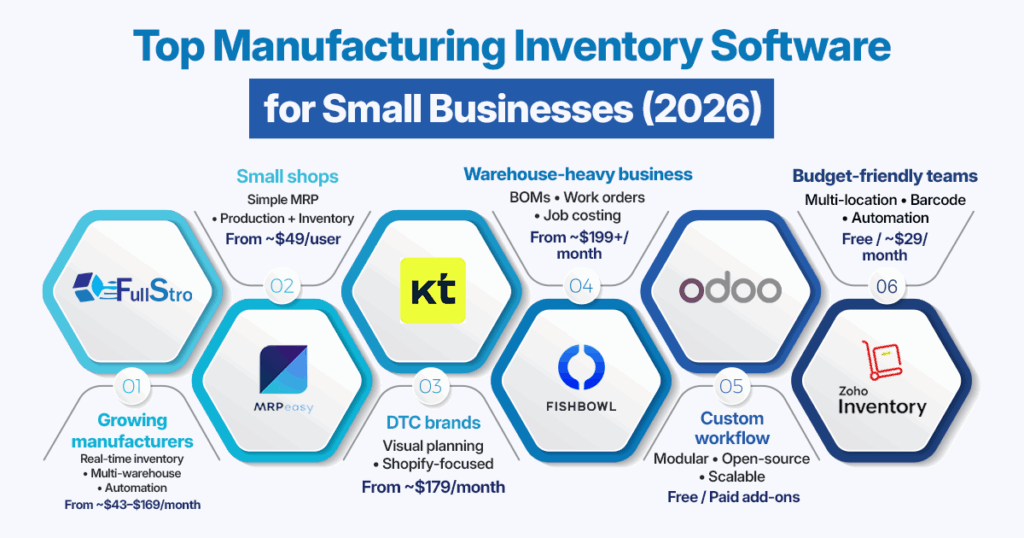
FullStro — A Ecommerce Automation Software built for growing manufacturing and wholesale businesses. FullStro offers real-time inventory tracking, multi-warehouse support, automation, analytics, and seamless scalability all without overwhelming small teams. It’s especially strong for businesses that want a balance between simplicity and advanced control as they scale. Pricing starts around $43–$169/month, depending on the plans.
MRPeasy — Super user-friendly cloud MRP built for small manufacturing shops. It combines production planning, inventory, procurement, and sales in one platform. Starts around $49/user/month and works smoothly with QuickBooks. Ideal if you want fast setup without complexity.
Katana Cloud Inventory — A visual and intuitive tool popular with DTC brands and modern manufacturers. Offers real-time inventory tracking, shop floor control, and strong eCommerce integrations (especially Shopify). Pricing starts around $179–$349/month, depending on scale.
Fishbowl Inventory — A solid choice for warehouse-centric manufacturing businesses. Supports BOMs, work orders, job costing, and deep QuickBooks integration. Pricing typically starts around $199+/month for smaller teams.
Odoo — Open-source and highly customizable, making it a flexible option for businesses with unique workflows. You can start with free or basic modules for inventory and manufacturing, then add features as you grow. Cost-effective if you want full control and customization.
Zoho Inventory — A budget-friendly all-rounder with essential manufacturing and inventory features. Supports multi-location inventory, barcode scanning, and automation. Offers a free tier, with paid plans starting around $29–$59/month, great for startups.
There’s no single “best” manufacturing inventory software — the right choice depends on your business size, budget, and growth plans. If you’re a small manufacturer in 2026, look for a system that’s easy to use today but powerful enough for tomorrow. Tools like FullStro stand out by giving small businesses enterprise-level control without enterprise-level complexity.
How to Choose the Right Inventory Software for Your Small Business
Picking the perfect software can feel overwhelming. Focus on these key considerations:
- Understand Your Needs – Audit your current inventory process and identify pain points.
- Ease of Use – Choose software that your team can adopt quickly without extensive training.
- Integration Capabilities – Make sure it connects with your accounting, ERP, or eCommerce tools to avoid double work.
- Automation Options – Look for reorder alerts, batch tracking, and workflow automation to reduce errors.
- Scalability and Customization – Your software should grow with you, not limit you.
- Cost Considerations – Include upfront cost, subscription fees, and potential hidden expenses in your evaluation.
You can also check out our detailed guide on how to choose the best multichannel inventory management system.
Step-by-Step Guide to Implementing Inventory Software
Implementing inventory software doesn’t have to feel overwhelming. When you follow a clear roadmap, the transition becomes smoother, faster, and far more successful. Below is a step-by-step guide to help you implement the system with confidence.
1. Audit Your Current Process
Start by reviewing how your inventory is currently managed. Look closely at how stock is received, stored, tracked, and fulfilled. Identify where delays happen, where mistakes occur, and which tasks take too much manual effort. This step helps you understand what’s working and what clearly needs improvement.
2. Define Your Pain Points
Once you understand your process, focus on the biggest problems slowing you down. These could be stockouts, overstocking, slow order fulfillment, inaccurate data, or poor visibility across warehouses. Clearly defining these pain points helps you prioritize the features you actually need from the system.
3. Choose the Right Software
Select inventory software that fits your business size and goals. Look for a system that is easy to use, supports automation, and integrates well with your existing tools like accounting, eCommerce, or ERP systems. The right software should simplify daily work, not add complexity.
4. Map Your Workflows
Before setting up the software, document how inventory flows through your business from purchasing and receiving to production, storage, and delivery. Mapping workflows ensures the system is configured correctly and reflects how your business actually operates, not how it works on paper.
5. Migrate Data Cleanly
Data migration is a critical step. Clean up your spreadsheets by removing duplicates, correcting errors, and standardizing product information. Import accurate data into the system so your inventory records start strong and reliable from day one.
6. Train Your Team
Your system is only as effective as the people using it. Train your team with hands-on sessions, simple guides, and real-life scenarios. When employees feel confident using the software, adoption becomes faster and mistakes are reduced.
7. Set Up Automations
Automation saves time and prevents errors. Configure features like low-stock alerts, automatic purchase orders, approval workflows, and notifications. These automations keep inventory flowing smoothly without constant manual supervision.
8. Track Performance and Improve Continuously
After the system goes live, monitor key performance indicators such as stock accuracy, order fulfillment speed, inventory turnover, and carrying costs. Use these insights to fine-tune workflows, improve planning, and continuously optimize your operations over time.
Common Challenges Small Manufacturers Face
Even with the best intentions, small businesses face inventory hurdles:
- Lack of real-time visibility leads to surprises.
- Overstocking ties up cash unnecessarily.
- Stockouts delay production and frustrate customers.
- Manual tracking increases errors.
- Scaling operations is difficult without proper systems.
FullStro: Ideal Manufacturing Inventory Software for Small Businesses
Small manufacturers need a system that’s powerful but not complicated. That’s exactly where FullStro stands out. It’s built to help growing manufacturing businesses stay organized, efficient, and ready to scale without the headache of complex software.
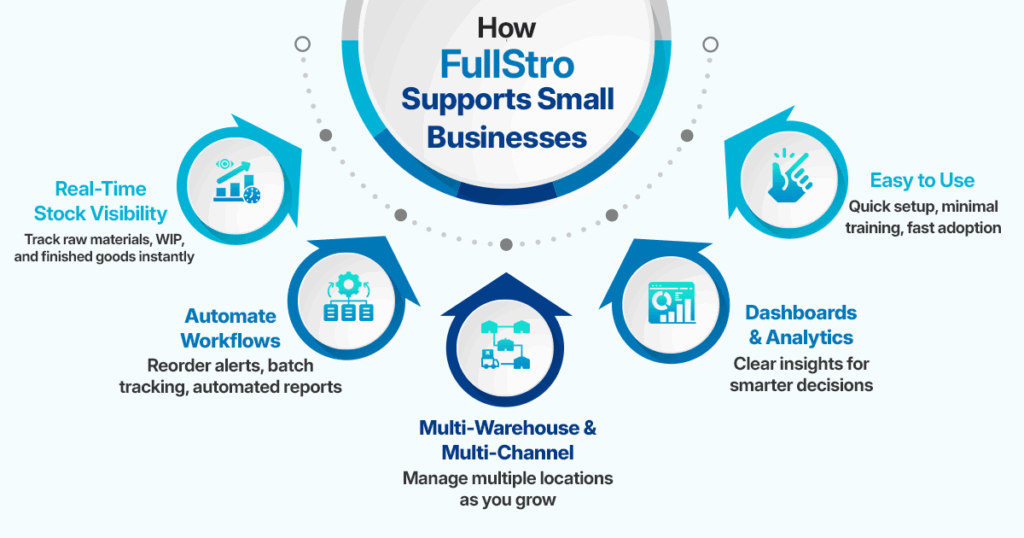
Designed with small manufacturers in mind, it provides:
- Real-Time Stock Visibility – Track raw materials, work-in-progress, and finished goods across all locations.
- Automated Workflows – Reorder alerts, batch tracking, and reporting reduce manual work.
- Multi-Warehouse & Multi-Channel Support – Scale operations seamlessly as your business grows.
- Intuitive Dashboards & Analytics – Make smarter decisions using actionable insights.
- Ease of Use – Minimal training required, so your team adopts it quickly.
With FullStro, small manufacturers save time, reduce errors, and improve efficiency, giving them more room to grow and compete with larger players.
Conclusion
For small manufacturing businesses, inventory management isn’t just about keeping track of stock — it’s about efficiency, growth, and profitability. Using manufacturing inventory software helps prevent errors, save time, optimize cash flow, and prepare your business for growth.
Investing in a system like FullStro means less stress, smoother operations, and more time to focus on what really matters: creating high-quality products and growing your business.